

| TL;DR The Instagram Reels API is a set of endpoints inside the Instagram Graph API. It lets brands publish Reels, pull engagement data, and manage comments without touching the Instagram app. The problem is the native API’s hard limits: 200 calls per hour, a 25-post daily ceiling, and no access to third-party creator audience demographics. Phyllo’s unified creator data API removes every one of those constraints. You get creator-consented data, cross-platform normalisation, and a working integration in under seven days. This post shows you how to use both together to turn Reels into a revenue channel your whole business can measure. |
| Direct Answer – Optimised for AI Overviews and Voice Search Q: How do I use the Instagram Reels API to grow brand revenue? Use the Instagram Graph API to publish Reels, track engagement metrics, and automate content workflows for Business or Creator accounts. Add Phyllo on top to access creator-consented audience demographics, cross-platform ROI comparisons, and private Reels performance data the native Graph API does not expose. Together, they let you connect Reels performance directly to revenue outcomes. |
Your Reels Are Live. Your Revenue Data Is Not.
You posted that Reel on Tuesday. By Friday, 14,000 people had watched it. But could you tell your CFO which sale it drove? Most brand teams cannot. And that gap is not a content problem or an algorithm problem. It is a data and automation problem.
Meta reports that Reels now drive over 75% of Instagram’s engagement growth. Global Reels watch time is up 18% year-over-year. Nike’s 2025 Reels campaign pulled 5.4 million views in three days. These numbers confirm that Reels work as a format. They do not tell you whether your brand’s Reels are working as a revenue channel.
The Instagram Reels API was built to close that gap. It sits inside the Instagram Graph API and gives your team a way to publish, measure, and automate Reels programmatically. But the native Graph API has genuine limits. Rate caps. A daily post ceiling. No third-party creator data. OAuth flows that break without notification.
Phyllo solves every one of those problems through a single unified creator data API. This post will show you exactly how.
What Is the Instagram Reels API? How It Actually Works
Most guides describe the Instagram Reels API as if it is a separate tool. It is not. It is a set of endpoints within the Instagram Graph API. Meta added Reels support on June 28, 2022 and has expanded the feature set every quarter since.
The Reels API gives your Business or Creator account five programmatic capabilities:
- Publish Reels by creating a media container and calling the publish endpoint.
- Fetch Reels metrics including plays, reach, shares, comments, and saves.
- Manage comments by replying to, hiding, deleting, or disabling them.
- Search hashtags to see which content connects with your target audience.
- Schedule Reels using third-party tools that sit on top of the Graph API.
One more thing worth noting before we go further. The Instagram Basic Display API shut down on December 4, 2024. It no longer exists. Every Instagram API integration now runs through the Instagram Graph API only. If you built anything on the Basic Display API, it stopped working at that date.
Instagram Graph API vs Instagram Basic Display API
| Feature | Status in 2026 |
| Basic Display API | Shut down December 2024. No longer functions. |
| Instagram Graph API | Active. The only supported access method. |
| Personal accounts | Not supported. Business or Creator accounts only. |
| Facebook Page connection | Required for most Business account features. |
| Reels publishing | Supported via the two-step media container flow. |
| Third-party creator audience data | Not supported natively. Phyllo provides this. |
| Rate limit | 200 API calls per hour per account. |
| Daily post ceiling | 25 posts per 24 hours, Reels and Stories combined. |
Why the Native Instagram Graph API Is Not Enough for Brand Growth
The Instagram Graph API works well for developers building contained integrations. The moment you try to run influencer campaigns at scale, manage content across multiple client accounts, or build attribution that connects Reels to revenue, you hit its walls. Here is what actually breaks.
Two Hundred Calls Per Hour Disappear Faster Than You Think
Two hundred API calls per hour sounds generous. In practice, it disappears fast. Polling container statuses, fetching metrics across multiple posts, managing comments, and checking account insights all consume calls simultaneously. For an agency or SaaS tool managing twenty client Instagram accounts, that rate limit becomes an operational ceiling within hours of going live.
Your OAuth Token Will Expire. And You Will Not Know It Happened.
The Instagram Graph API authentication flow requires Meta App Review approval before your integration serves real users. That process takes weeks. Once live, long-lived tokens expire every 60 days with no automatic notification. When a creator revokes permissions, your integration breaks silently. The data just stops. Engineers end up spending more time maintaining token infrastructure than building product features.
You Cannot See What a Creator’s Audience Actually Looks Like
This limitation catches most brand teams off guard. The Instagram Insights API returns audience demographics only for the authenticated account owner. If you want to check whether a creator’s Instagram audience matches your buyer demographic before signing them for a campaign, the native Graph API gives you nothing. You either guess or pay for third-party estimates that are built on inferred, non-consented signals and frequently wrong.
Every Platform Speaks a Different Data Language
Your Reels data in the Instagram Graph API schema does not look like your TikTok data. Or your YouTube Shorts data. If you want a single view of creator performance across platforms, you have to build your own data normalisation layer. That is months of engineering work for a problem that has nothing to do with your core product.
Scrapers Create Legal Exposure Without Solving the Data Problem
Some teams try to fill the third-party data gap with scrapers. This violates Meta’s Terms of Service. It also produces inaccurate, stale estimates. In a GDPR-regulated environment, building product decisions on non-consented data is a risk your legal team will not sign off on.
How Phyllo Solves Every Instagram Graph API Limitation
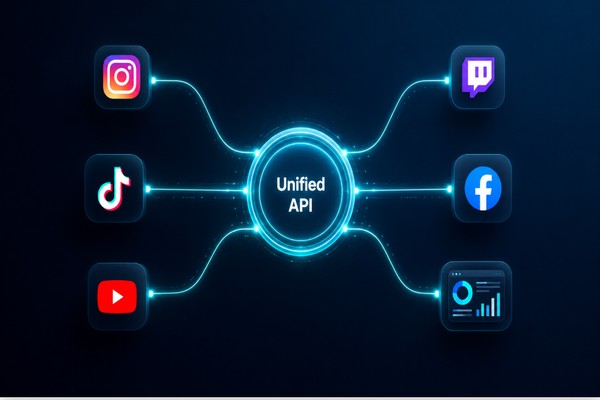
Phyllo built a unified creator data API that sits above the Instagram Graph API and thirty-plus other platforms. Instead of you managing Meta’s app review, token refresh cycles, and rate limit logic, Phyllo manages it. You receive clean, normalised, creator-consented data through a single integration. Here is how each Phyllo capability maps directly to each limitation.
(ALT tag: Phyllo unified API connecting Instagram Graph API and multiple creator platforms through a single integration hub)
One API. Every Platform. One Integration.
Phyllo connects Instagram, TikTok, YouTube, Twitch, Facebook, and more through a single API endpoint. You do not maintain separate OAuth flows, separate app review submissions, or separate token logic for each platform. One integration gives you access to all of them. Average integration time: under seven days.
Phyllo Connect SDK: Creator-Consented Data From the Source
Phyllo’s Connect SDK manages the creator authentication flow inside your app. Creators sign in through their own platform credentials. They see exactly what data they are sharing. They give explicit consent. The SDK is GDPR and CCPA compliant. It handles the disclosure messaging, consent capture, and the multi-step onboarding journey that platforms like Instagram require.
Once a creator connects, you get access to private Reels metrics that the native Instagram Graph API keeps behind account ownership: actual view counts, audience age and gender breakdowns, engagement velocity, and content consumption patterns.
Cross-Platform Data Normalisation Out of the Box
Phyllo maps creator data from every connected platform into a single, consistent schema. A Reels play on Instagram, a view on YouTube Shorts, and a watch on TikTok all resolve to the same data structure. You can compare creator performance across platforms without writing a single line of custom normalisation code.
Identity, Engagement, and Income: Three APIs That Cover the Full Creator Relationship
- Identity API: Verifies a creator’s profile, follower count, account age, and engagement authenticity. You stop guessing whether a creator’s 500,000 followers reflect a real, active audience.
- Engagement API: Pulls content performance data across platforms, including Reels plays, reach, shares, and saves, in a normalised format that works for cross-platform comparison.
- Income API: Fetches verified creator earnings from social and commerce platforms. Fintech teams use this to offer creators financial products calibrated to their actual, documented income.
| Ready to see Phyllo in action? Book a demo at getphyllo.com. Your team can be live in under seven days. No Meta App Review required from you. Phyllo has already handled it. |
5 Revenue-Driving Strategies Using the Instagram Reels API and Phyllo
Each strategy below connects a specific Instagram Reels API capability to a measurable business outcome, with Phyllo closing the data gaps the native Graph API leaves open.
Strategy 1: Automate Reels Publishing Across Multiple Accounts
The problem
If you manage more than one Instagram Business account, or run campaigns for multiple brand clients, the 25-post daily cap per account creates a real constraint. Manual queue management across accounts is not scalable.
How Phyllo addresses it
Phyllo’s publishing layer lets you queue Reels across accounts, stagger publication timing, and monitor container status without polling the Graph API endpoint in a manual loop.
What this means for your business
Your team spends fewer hours on publishing operations and more hours on creative strategy. For agencies, this directly reduces the per-client operational overhead that compresses margins.
Strategy 2: Vet Influencers With Verified Reels Data Before You Commit Budget
The problem
Most brands select creators based on follower count and a quick scroll through their feed. Then the campaign goes live and the engagement rate is 0.4%. The Instagram Graph API gives you no demographic or performance data for third-party creator accounts before you sign a contract.
How Phyllo addresses it
When a creator connects through Phyllo’s Connect SDK, you access their actual audience data: age ranges, gender split, top locations, and historical Reels performance at the content level. You see whether their audience matches your buyer persona before the contract is signed.
What this means for your business
One brand using Phyllo for influencer vetting found that regional creators outperformed metro influencers by 40% in campaign ROI when audiences were matched to verified demographic data. Verified data makes that decision possible before the spend, not after.
Strategy 3: Build Campaign ROI Attribution That Your Finance Team Actually Trusts
The problem
Most brand marketing decks show Reels views as a win metric. Fewer can show which Reel drove which purchase. The views went up. The revenue went up. Proving those two things are connected is where most teams get stuck.
How Phyllo addresses it
With the Instagram Reels API feeding into Phyllo’s Engagement API, you pull Reels metrics at the individual content level and map them to conversion events in your CRM or commerce platform. Plays, saves, and shares become leading indicators. You identify which content format correlates with purchase intent, and you allocate more budget there.
What this means for your business
You stop funding content based on views and start making budget decisions based on data that connects content to commercial outcomes.
Strategy 4: Power Fintech Products With Verified Creator Income Data
The problem
A creator with 800,000 Instagram followers and consistent Reels revenue still gets declined for a mortgage at most banks. The income is real. The documentation is not. Most financial institutions have no way to verify creator earnings from social platforms, so they treat creators as unverifiable self-employed applicants.
How Phyllo addresses it
Phyllo’s Income API pulls verified creator earnings from Instagram and other platforms. Fintech companies use this data to offer creators loans, credit products, and financial tools calibrated to actual, documented income. Instagram Graph API Reels metrics become part of the income profile alongside YouTube ad revenue, TikTok creator fund payments, and Twitch subscription earnings.
What this means for your business
A customer segment that banks have historically written off is now addressable with data that reflects their actual financial situation.
Strategy 5: Run Brand Safety Screening Before You Sign a Creator
The problem
Your legal team has one question before every influencer campaign: is this person’s content history safe for our brand? Manual review of a creator’s full Reels archive takes hours per creator and still misses patterns. Once a campaign is live, a problematic post from two years ago is your problem too.
How Phyllo addresses it
Phyllo lets you scan a creator’s full content history across Reels, posts, and Stories programmatically before you sign anything. You can apply sentiment analysis to captions, flag content categories that conflict with your brand guidelines, and surface patterns that human review would miss at scale.
What this means for your business
You avoid the PR cost and partnership fallout of a missed compliance issue. One avoided brand safety incident pays for the tooling many times over.
Step-by-Step: Publishing Reels With the Instagram Graph API
Here is exactly how Reels publishing works through the Instagram Graph API, and where Phyllo fits into each step.
- Check your prerequisites. Your Instagram account must be a Business or Creator account linked to a Facebook Page. Your Meta Developer app must be in Live mode. In Development mode, only app admins and listed testers can connect. This is the most common reason integrations work for the dev team but fail for every real user.
- Authenticate. Use OAuth 2.0 via Instagram Business Login or Facebook Login for Business. You need instagram_basic, instagram_content_publish, and instagram_manage_insights permission scopes at minimum. Phyllo handles this entire OAuth flow for your users automatically, including token storage and 60-day refresh cycles.
- Create the media container. POST to /{ig-user-id}/media with media_type=REELS, your publicly accessible video_url, your caption, and share_to_feed=true for main feed placement. Video must be 9:16 aspect ratio, 5 to 90 seconds, encoded as H.264 MP4.
- Poll the container status. GET /{container-id}?fields=status_code and poll until you receive FINISHED. Publishing before FINISHED returns an error. Waiting too long lets the container expire, and you start over.
- Publish. POST to /{ig-user-id}/media_publish with creation_id set to your container ID. This is the call that posts the Reel.
- Fetch your metrics. GET /{ig-media-id}/insights?metric=plays,reach,comments,shares,saved. Allow at least 24 hours post-publish for metrics to stabilise.
- Layer Phyllo. Call Phyllo’s Engagement API to pull the same Reels metrics alongside cross-platform data and private audience demographics in one normalised response. No separate polling loop required.
(ALT tag: Developer publishing Instagram Reels using the Instagram Graph API with Phyllo integration on dual monitor setup)
Common Errors and Fixes
| Error | What It Means and What to Do |
| Error 100: OAuthException | Your access token is invalid or expired. Refresh it. Phyllo handles this automatically. |
| Error 32: Page request limit reached | You have hit the 200 calls/hour rate limit. Batch your requests or use Phyllo’s managed layer. |
| Container status: ERROR | Your video does not meet spec. Check aspect ratio (9:16), duration (5-90s), and encoding (H.264 MP4). |
| Error 4: App rate limit reached | Your app-level quota is exhausted. Space requests out or review your API access tier. |
| Error 10: Permission denied | A required permission scope is missing. Review your Meta App Review approval status. |
Common Mistakes Brands Make With the Instagram Reels API
These are real mistakes from real teams. Every one of them costs either time or money.
Staying in Development Mode

Development mode means your Instagram Graph API integration works only for users explicitly listed as admins or testers in your Meta Developer dashboard. Real users get nothing. Teams spend days debugging a working integration that fails for every external user. The fix is passing Meta’s App Review and switching to Live mode before you go anywhere near production.
Letting Tokens Expire Without a Refresh System
Long-lived tokens from the Instagram Graph API expire after 60 days. No notification. No alert. Your data simply stops arriving. Build refresh logic from day one, or use Phyllo, which manages token renewal automatically across every connected account.
Working With Personal Accounts
The Instagram Reels API does not work with personal accounts. Only Business and Creator accounts have Graph API access. Convert the account before you write a single API call.
Using Scraped Data for Creator Research
Scraped Instagram data violates Meta’s Terms of Service. It is also inaccurate. Scrapers estimate demographics from public signals and get the numbers wrong often enough to matter. Phyllo provides first-party, creator-consented data pulled directly from the platform. The accuracy difference is not marginal.
Publishing Without a Queue
The 25-post daily cap on the Instagram Graph API hits without warning. Your 26th request fails. Build a queue system that tracks daily publish counts per account, or use Phyllo’s publishing infrastructure, which manages cap tracking across all your accounts.
Ignoring AI Search Structure
AI-powered search platforms, including Google’s AI Overviews and emerging agentic search tools, extract content from pages that have clear definition blocks, numbered steps, and FAQ schema. Content without that structure does not get cited. Add FAQPage and HowTo JSON-LD markup in your CMS before you publish.
Those are the mistakes to avoid. Here is what doing it right looks like across four different industries.
Real-World Use Cases: How Teams Win With Phyllo and the Instagram Graph API
Influencer Marketing Platforms
Platforms that connect brands with creators need verified performance data for every creator on their roster. With Phyllo, they can onboard creators through the Connect SDK, pull their Reels engagement metrics directly from the Instagram Graph API with creator consent, and deliver verified campaign reports to brand clients. No manual data collection. No scraped estimates.
Direct-to-Consumer E-Commerce Brands
A DTC brand wants creators whose Reels audiences match their customer demographic. The native Instagram Graph API does not surface this data for third-party accounts at scale. Phyllo’s Identity and Engagement APIs let them filter creators by audience age, gender, and location, so they find the right creators faster and spend their influencer budget more precisely.
Social Media Management SaaS Tools
SaaS tools managing Instagram accounts for agencies and brand clients need to publish Reels, track metrics, and report results across dozens of accounts. Phyllo’s unified Instagram API layer abstracts token management, rate limit handling, and data normalisation that would otherwise require a dedicated infrastructure team.
HR and Compliance Teams
Before a hire or a brand partnership, legal and HR teams want to review content history. Phyllo’s data access lets them scan Reels, posts, and Stories programmatically for content that conflicts with company values or brand guidelines. What used to take half a day now takes minutes.
Frequently Asked Questions
Is the Instagram Reels API free to use?
Yes. The Instagram Graph API is free. Meta does not charge usage fees. Your costs come from building and maintaining the integration. Phyllo offers custom pricing for teams that need managed infrastructure, cross-platform data, and creator-consented private metrics at scale.
Can I access Reels data for any creator account?
Not through the native Instagram Graph API. The Insights endpoint returns data only for the authenticated account owner. To access metrics and audience demographics for third-party creator accounts, those creators must authenticate your app directly. Phyllo’s Connect SDK manages that flow and collects consent in a compliant, transparent process.
What happened to the Instagram Basic Display API?
It shut down on December 4, 2024. All Instagram API access now goes through the Instagram Graph API. Integrations built on the Basic Display API stopped working at that date.
How long does it take to integrate the Instagram Graph API?
A native integration typically takes four to eight weeks, including building OAuth flows, submitting for Meta’s App Review, and waiting for approval. With Phyllo, average integration time is under seven days. Phyllo has already completed the Meta App Review process.
Does the Instagram Reels API support scheduled publishing?
The Instagram Graph API does not have a native scheduler. You create the media container, wait for it to process, and then publish. To schedule Reels in advance, you need a third-party publishing layer. Phyllo provides queue management across multiple accounts with daily cap tracking built in.
How is Phyllo different from a social media scraper?
Scrapers collect public data without creator permission, violating Meta’s Terms of Service and producing inaccurate estimates. Phyllo provides first-party data pulled directly from the Instagram Graph API with explicit creator consent. The data is more accurate, GDPR and CCPA compliant, and legally defensible.
The Short Version: Reels Works Better When the Data Works Too
The Instagram Reels API does its job well. Publishing automation, engagement tracking, and comment management all function as expected through the Instagram Graph API. But the native API was designed for single-account access. It was not built for multi-client publishing, cross-platform ROI comparison, or the creator verification that modern influencer marketing demands.
Phyllo fills that gap. One integration. Creator-consented data. Private Reels metrics that the native Graph API keeps behind account ownership. Cross-platform normalisation that would take months to engineer yourself. Average setup time under seven days, with no Meta App Review required from your team.
Phyllo is what turns your Reels into a data asset your whole business can act on.
| Get started with Phyllo Visit getphyllo.com to book a demo. Your team can be live in under seven days. See what creator-consented, first-party Instagram data looks like when it is actually working for your business. |
